
Is it safe to upload Aadhaar, PAN or work files to PDF sites?
You need to compress your e-Aadhaar for a form, merge salary slips for a loan, or email an HR file that is too large. Search for a way out and dozens of free PDF sites come back. What happens to your file on them, what they say about deleting it, and when not to upload at all.

Indian users joke that iLovePDF is the country's unofficial government database, because everyone has passed their e-Aadhaar, PAN card and marksheets through it to meet some portal's size limit. It is a joke, but the question behind it is fair: when you compress a bank statement or merge your salary slips on a free site, where does that file go, and what happens to it afterwards?
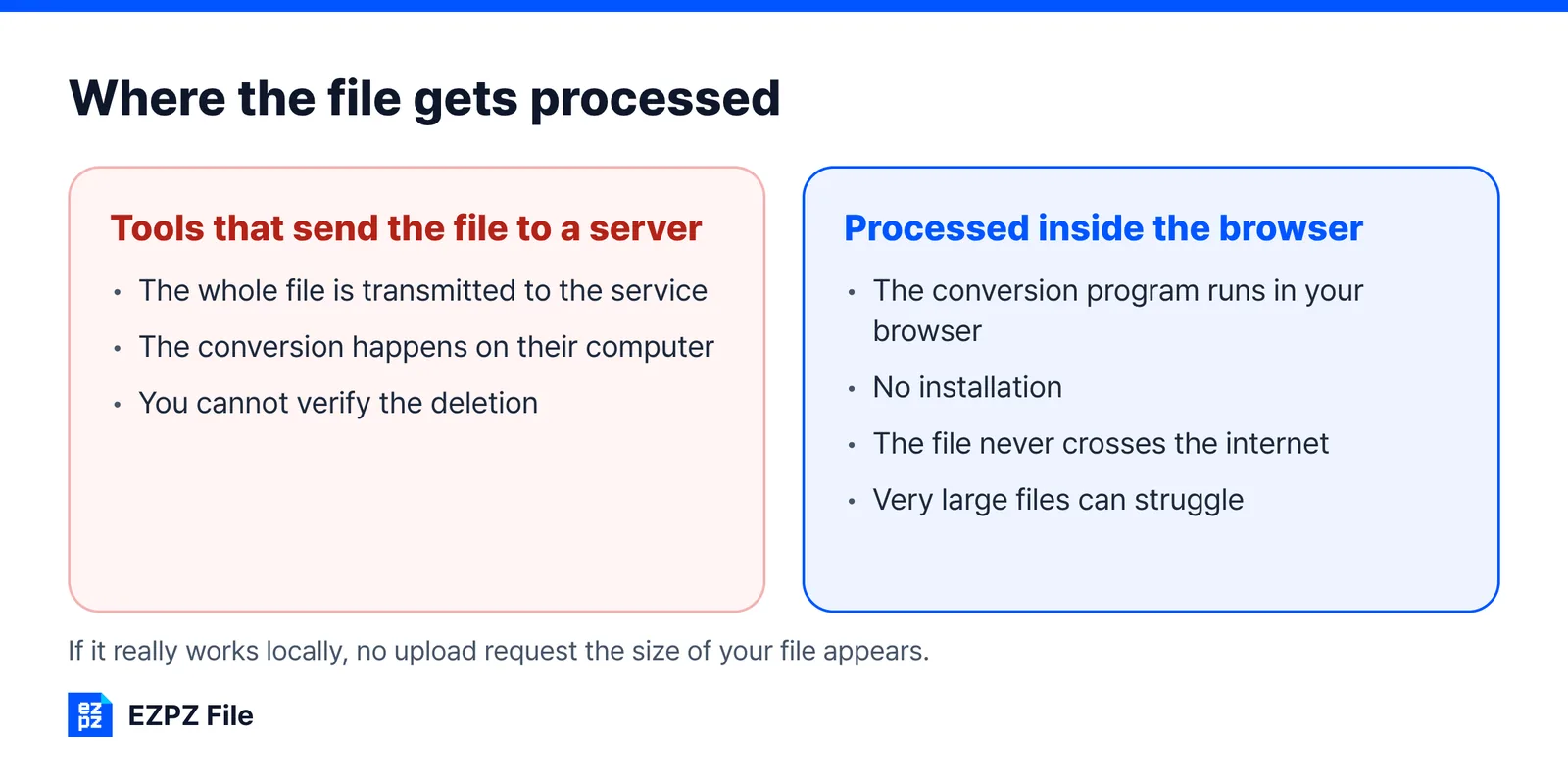
The rule of thumb is simple: do not upload work documents to online converters. But the risk comes from the upload, not from the conversion. A tool that never sends the file to a server and does the work inside the browser leaves nothing to expose, because the file never travels. EZPZ File works that way: there is no upload step at all.
This article answers that with what the services themselves say. The short version: the big services are run properly and state clear deletion times, but for some documents the right move is not to upload them at all.
How online converters handle your file
The large majority work by uploading.
When you pick a file in the browser, the whole file is transmitted to the company running the service. The conversion happens on their computer, and you download the result afterwards.
There is nothing inherently wrong with this. Server-side processing finishes heavy jobs quickly and gives consistent results regardless of how fast your own machine is. The price is that the file leaves your hands.
What each service says it does with your file
Here is what the major services state publicly.
| Service | Processing | Stated retention policy |
|---|---|---|
 Smallpdf Smallpdf | Server upload | Deleted one hour after processing |
 iLovePDF iLovePDF | Server upload | Automatically deleted within two hours |
| FreeConvert | Server upload | SSL in transit, deleted after eight hours |
| ImageResizer | Server upload | Deleted within eight hours |
| AnyConv | Server upload | Deleted automatically after conversion |
 Polaris Office Tools Polaris Office Tools | On-device | Nothing is uploaded to a server |
 EZPZ File EZPZ File | In-browser | Nothing is transmitted to a server |
These policies can change. For anything important, read the privacy policy on the site itself rather than trusting a summary. This table reflects September 2026; re-check each service's own privacy page before relying on it.
On paper there is nothing alarming here. Most of these have operated for years, and there is no evidence any of them go looking inside your files.
Why it still deserves caution
The risk is not "is this a bad company". It is the structure: you hand over control.
1. You cannot verify the deletion
Deletion after an hour is a promise, not something you can check. Whether a copy survives on a backup server or in a log, or whether a subcontractor touched it, is not visible from the outside.
2. Encryption in transit is not encryption at rest
SSL stops someone reading the file while it travels. What happens once it lands on the server is a separate question, and if that company suffers a breach, files sitting in storage go with it.
3. It may break your employer’s rules
In practice this is the one that bites. Most companies and public bodies have rules about sending internal material outside. If yours says "do not transmit work material to unapproved external services", then uploading a contract to a converter breaks that rule the moment you do it.
Whether the service is actually safe is beside the point. A rule like that looks only at the act of uploading.
India's data protection law in one paragraph
India's Digital Personal Data Protection Act, 2023 describes itself as "An Act to provide for the processing of digital personal data in a manner that recognises both the right of individuals to protect their personal data and the need to process such personal data for lawful purposes". In plain terms, organisations that process your personal data have obligations, and you have rights over it. The detailed rules start in stages: according to the DPDP Rules 2025 notified in the Gazette (G.S.R. 846(E), 13 November 2025, read via a copy of the gazette), most of the operative rules "shall come into force eighteen months after the date of publication". As of 2026, check the current notice on MeitY's site for what is already in force.
What the law does not do is make your upload risk-free. It sets obligations for the company; it cannot undo a copy that has already left your phone. The safest file is still the one you never sent.
Documents worth keeping off these sites
| Type | Examples |
|---|---|
| Identity documents | e-Aadhaar, PAN card, passport pages, voter ID |
| Financial | Bank statements, salary slips, Form 16, loan papers |
| Education and exams | Marksheets, certificates, admit cards with photo and signature |
| Contracts and legal | Rent agreements, offer letters, settlements |
| Unreleased work material | Proposals, client files, internal reports, anything marked confidential |
The reverse is also true: if the material is already public, there is little to worry about. Notices, flyers, published papers and your own photos are fine to run through an upload-based service.
Prefer masked or official copies
Often you do not need to send the full document at all. Where the receiver accepts it, share a copy with most of an ID number hidden, or only the page they asked for. For documents issued to you by government bodies, DigiLocker is the official place to keep and share them. Its FAQ also covers files you add yourself: "Maximum allowed file size is 10MB." and "File types that can be uploaded - pdf, jpeg & png."
There is one catch worth knowing. A Passport Seva notice states: "Documents uploaded to DigiLocker Drive are NOT treated as authentic documents." The issued documents in DigiLocker are what count; a scan you put there yourself is just storage.
Ways to convert without uploading
1. Installed software
The most certain option. The file never leaves your machine.
- PDF: Adobe Acrobat, PDF24 Creator and similar
- General purpose: LibreOffice
The catch is installation. Work computers often block it outright, and installing something for a single one-off job is a chore.
2. A tool your company already pays for
Overlooked more often than you would think. If there is already an Adobe licence or a document management system in place, that is the safest choice as far as the rules are concerned. Asking whoever handles information security is the fastest route.
3. Web tools that work inside the browser
A newer option converts the file inside the browser instead of sending it anywhere. The technique is WebAssembly: the conversion program itself runs in your browser.
It sits between the first two options: no installation, and nothing leaves. EZPZ File works this way, and it is our own site, so weigh that. For the jobs people most often do with ID and bank documents, Compress PDF, Merge PDF and Remove metadata (author name, software and dates hidden inside a PDF or photo) all run in the browser.
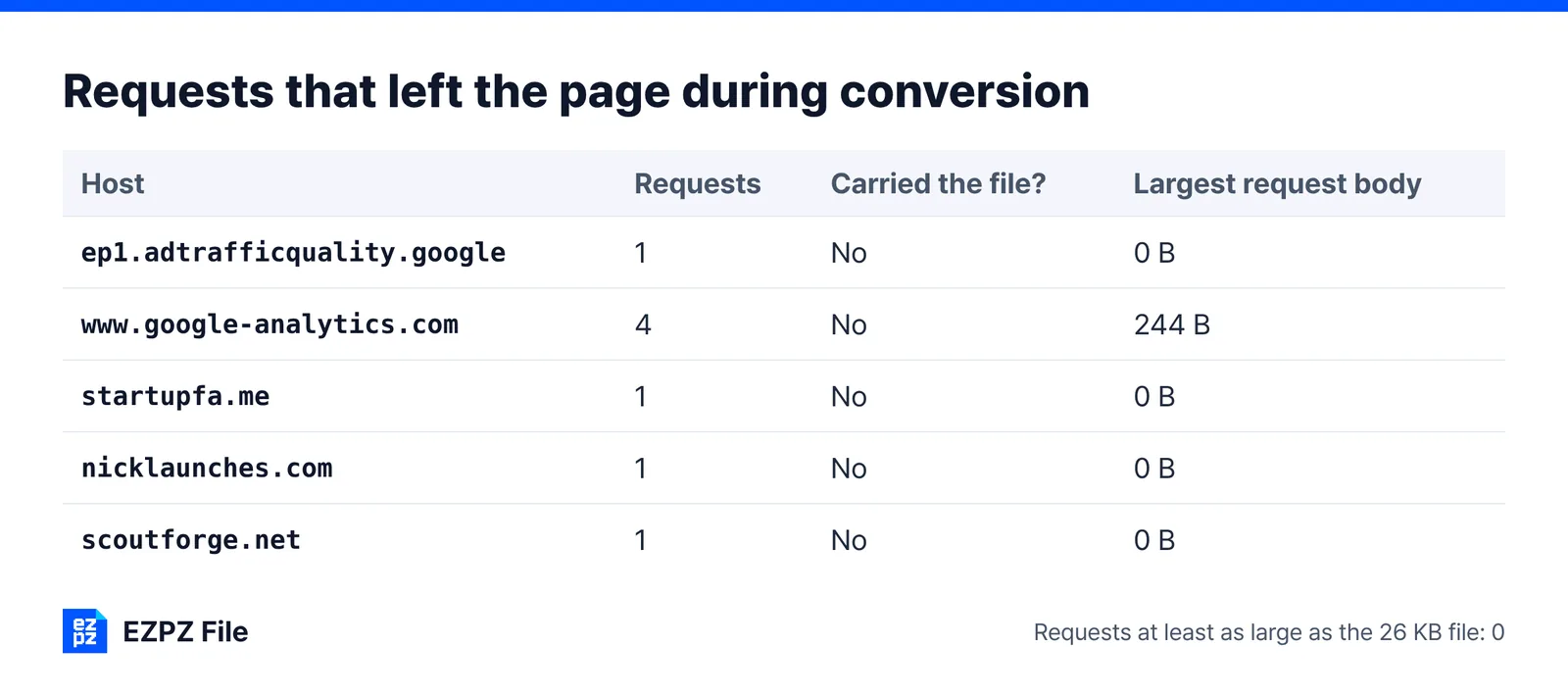
You can check the claim yourself. Open the network tab in developer tools (F12), then run a conversion. If it really works locally, no upload request the size of your file appears.
It has limits. Browser memory means very large files or batches of dozens can struggle, and heavy jobs such as turning a PDF into Word with the formatting intact still come out better on a server.
4. Do not convert at all
Simple, and often enough. Send the original format, or save straight to the format you need from the program that made the document. "Save As → PDF" in Word or Hancom removes the need for a converter entirely.
In short
None of this makes free converters dangerous. Most are run properly, and for public material they are a convenient tool.
It is the document that should decide.
- Material that could be public → any service is fine
- Personal, contractual, financial or unreleased material → installed software or in-browser processing
- Not sure → ask whoever handles information security
One question is enough. Before you upload, ask whether it would be a problem if this leaked. If the answer is yes, find another way.
If what pushes you to these sites is the free daily limit or a sign-up wall, our pages on free PDF tool limits and on file tools that need no account cover those.
Common questions
- Is iLovePDF safe for Aadhaar card?
- iLovePDF states that uploaded files are automatically deleted within two hours, and there is no evidence it looks inside them. But the file still leaves your device, and you cannot verify the deletion. For e-Aadhaar, use a tool that works in your browser or installed software, and share a masked copy where accepted.
- Do PDF sites delete my files?
- The big ones say so: Smallpdf one hour after processing, iLovePDF within two hours, others within eight hours (as of September 2026). That is their stated policy; you cannot check it from outside.
- What is the safest way to compress a PDF?
- One where the file never leaves your device: installed software, or a browser tool that compresses locally. You can confirm a browser tool in the developer tools Network tab: no upload request the size of your file should appear.
- Is it safe to use a free online PDF editor for a sensitive document?
- For public material, yes. For ID, bank, salary or contract documents, many people decide against it, for the reasons above. Use a browser-side or installed editor instead.
- Does using one at work leave a trace?
- Corporate networks generally log connections and upload traffic. Whether you broke a rule is judged separately from whether the service was safe, so check the internal policy first.
- How do I know a tool really works in the browser?
- The network tab in developer tools shows it. Pick a file, and if no upload request the size of that file appears, it was processed locally.
Last updated October 14, 2026 · Information as of October 2026. Service policies as stated in September 2026; DPDP Act, DigiLocker and Passport Seva pages checked on October 14, 2026. Service policies are subject to change.


