
How to identify a font from an image
You saw a typeface you like on a poster, a menu or a screenshot, and you have no idea what it is called. This guide walks through finding it from one image: how to crop it, how to read the results, and what to do when the answer still looks wrong.

In November 2024 someone on Reddit summed up a common frustration in the title of a post, after the font detection site they relied on kept giving answers that did not match.
WhatTheFont never tells me the right font
Post title, 4 November 2024, 18 upvotes
It is not just one site. In April 2026 a poster in r/identifythisfont said they had tried several detection sites and all of them failed. In another thread the tools kept missing a logo, and the reason turned out to be that the logo mixed two fonts. The poster went back and shared a cleaner sample. That story says a lot about how these tools work, and about how to help them.
Full disclosure: we make the EZPZ font finder. Everything described below was checked in EZPZ on 27 October 2026, and the test images were made with fonts released under the SIL Open Font License (OFL).
Why font detection often misses
A miss usually comes down to one of three things. The font may not be in the tool's list at all: a site that only knows free fonts can never return a paid typeface or a font that ships with Windows or macOS. The image may be poor: small, blurry or angled letters hide the stroke weight and endings the comparison depends on. Or it may never have been a font. Logos and hand-painted signs are often drawn by hand, or built from two fonts, as in the Reddit thread above.
| Why it misses | What to try |
|---|---|
| The font is not in the list | Use a tool that also searches paid and built-in fonts |
| Letters are small or blurry | Crop to just the text and try again |
| Photo taken at an angle, curved surface | Use a close, straight-on shot |
| Logo or hand lettering | Look for a similar font, not an exact one |
1. Prepare the image: crop tight
The image changes the result more than anything else. If you took a full-screen screenshot, crop it to the one line you care about. A few words are enough. For Latin text, pick a line with varied letters: a word with a g, a, R or Q tells fonts apart far better than a row of capitals like III or OOO. If it is a photo, take it close and straight on, and skip parts with shadows, outlines or glow.
2. Add it: drop, paste or choose a file
Open the EZPZ font finder and drop the image anywhere on the page. Right after a screenshot you can paste it with Ctrl+V, or use Choose image. On a phone, tap Find a font from a photo. The image is processed in your browser and never sent anywhere. Only letter shape data for the fonts is downloaded.
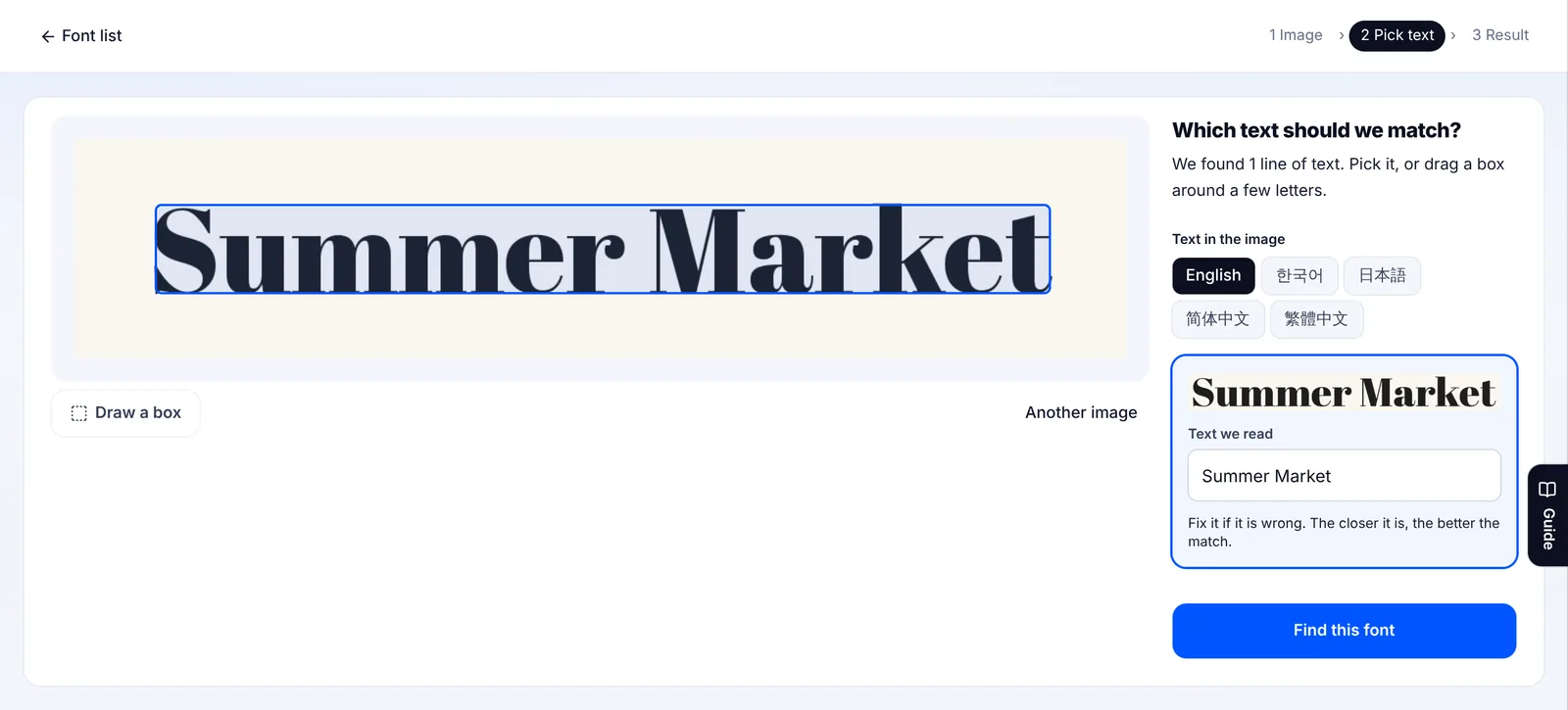
The finder spots lines of text on its own and outlines them with dashed boxes. Tap one and the text it read appears in the box below. If the reading is wrong, fix it: the closer it is, the better the match. If none of the lines suit you, use Draw a box and drag around a few letters.
3. Read the result: match labels and tags
Press Find this font and the closest font appears at the top. Side by side puts your image above the same text set in that font. Overlay stacks the two so you can see where they drift apart. The label in the corner tells you how close it is: Very close, Close or Not sure. Below, the list continues in order of similarity, with a percentage on every card.
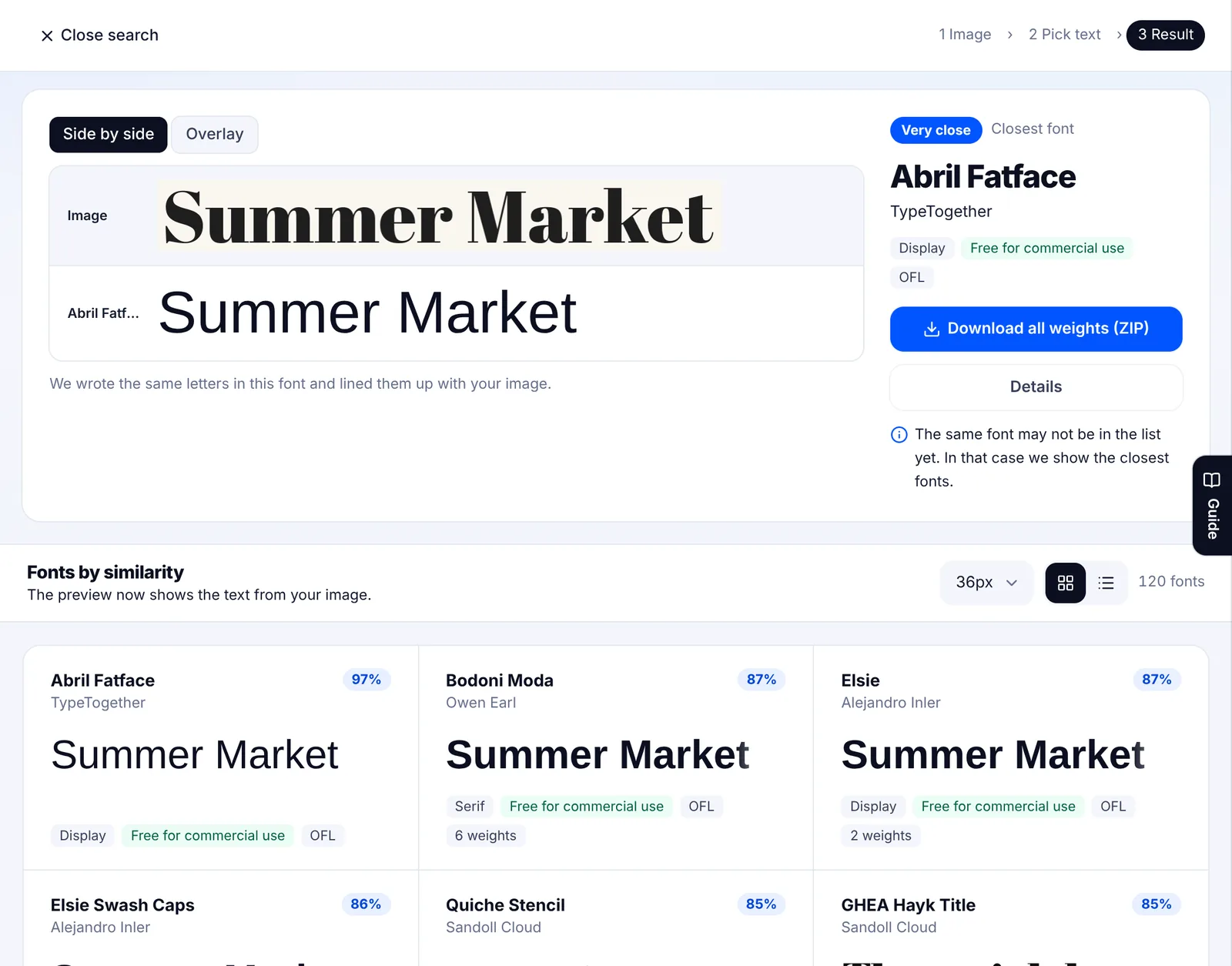
Check the tags on each card too. They tell you where the font comes from and what you can do with it.
| Tag | Meaning | Next step |
|---|---|---|
| Free for commercial use | A free font you can use commercially | Get it from the official source and read the license |
| OFL | Released under the SIL Open Font License | Download all weights from Google Fonts as a ZIP |
| Paid | Sold by a foundry or reseller | Try your own text on the seller's page, then buy |
| Built into Windows, Built into Mac & iPhone | Ships with the operating system | Nothing to download, but check the OS terms before you redistribute it |
Which fonts are in the list
These are the filter counts shown in the list on 27 October 2026. Free fonts come from Google Fonts, noonnu and makers' official pages. Paid fonts appear with the seller's preview image and a link to buy. Built-in fonts include Mac families such as Arial, Avenir and Baskerville alongside the Windows ones.
| Language | Free for commercial use | Paid | Built into Mac / Windows | Total |
|---|---|---|---|---|
| English (Latin) | 1,401 | 2,183 | 96 | 3,680 |
| Korean | 858 | 3,643 | 13 | 4,502 |
| Japanese | 267 | 1,325 | 17 | 1,609 |
| Chinese (10 Simplified, 15 Traditional) | 25 | 0 | 0 | 25 |
Added up across languages that is about 9,900 fonts. We do not hand out font files. The download button takes you to Google Fonts or the maker's page, and paid fonts link to the seller.
If the match is a paid font, look at free look-alikes
If the closest font is paid, buying it from the seller is the sure way to get the exact look. If that is not an option, turn off Paid and Built into Mac / Windows in the price filter on the left of the results. The list keeps its similarity order and shows only free fonts, with the closest in feel first.
Can you use the font you found?
Free for commercial use does not always mean free for everything. Some fonts restrict logos, modified versions or embedding in documents and apps. Read the license on the official page before you use one. We wrote up the checks in how to pick commercial-use free fonts, and where to download free fonts safely in a separate guide.
When nothing matches
- Check the text the tool read. One wrong letter throws the comparison off.
- Use Pick another line and choose a larger, straighter line. Headlines and body text often use different fonts.
- Use Draw a box around a few letters without effects.
- Torn between two candidates? Use Overlay and compare the terminals, the bowls and the x-height.
- Connected script fonts, very small or blurry text and signs shot at an angle are still hard. Treat the result as a list of similar fonts.
Sometimes a PSD you were sent opens with a fallback font because the original is not on your computer. If you have a screenshot of how it should look, you can find the font name from that. We covered opening the file in open a PSD without Photoshop.
Font names and names such as WhatTheFont, Reddit, Google Fonts, Windows, Mac and Avenir mentioned here are trademarks of their owners. EZPZ File is not affiliated with any of them.
Common questions
- Is my image sent to a server?
- No. Finding the letters and comparing them with the fonts happens in your browser. Only the letter shape data for the fonts is downloaded.
- Why do font detection sites keep giving the wrong answer?
- Usually the font is not in their list, the image is too small or angled, or the text is a custom logo. Crop to one clean line, fix the text the tool read, and use a tool that also includes paid and built-in fonts. (Source: Reddit)
- What if the text is a logo made from two fonts?
- Search each part separately. Draw a box around just the letters that share one style, then do the same for the rest. (Source: Reddit)
- Does it find paid fonts?
- Yes. Paid fonts are ranked together with free ones and marked Paid. Tapping one opens the seller's page.
- Does it work on a phone?
- Yes. Tap Find a font from a photo to use the camera, your photo library or a screenshot.
Last updated October 27, 2026

