
How to save a chat as a PDF and print it
Years of messages, and someone wants them on paper. Scrolling and screenshotting is not a plan. Export the chat to a file, open it in your browser, pick the conversation and the dates, and you get one PDF with a date and time on every message. Here are the steps and the checks to do before you print.

A post on r/MacOS put it plainly. The poster needed a whole iMessage conversation that ran for years, and the one built in route seemed to be scrolling up and taking screenshots. More than three hundred people upvoted it.
I'm not going to be able to scroll thousands of times
June 2023, asking how to export a years long iMessage conversation. Score 322
Others ask for the same thing with different reasons. One person wanted a format where every message carries its own date and time. Another wanted to print a WhatsApp chat with the photos in it.
Why screenshots fall short
| Screenshots | Export, then PDF | |
|---|---|---|
| Dates | Shown once a day, so many pages have none | A date line wherever the day changes |
| Times | Only what fits on screen | Next to every message |
| Pages | One screen per page | Bubbles packed onto A4, far fewer pages |
| Gaps | Easy to skip a stretch without noticing | The save window shows the message count |
| Photos | As seen | Names only in the PDF; use HTML for photos |
Export, open, choose the chat and dates, save the PDF
Getting the file depends on the app. In WhatsApp, open the chat, then the ⋮ menu on Android or the contact's name on iPhone, then More > Export chat, with or without media. iPhone Messages has no export button, so you make an unencrypted backup of the iPhone on a computer and use that folder; the steps are in how to read iPhone texts from a backup.
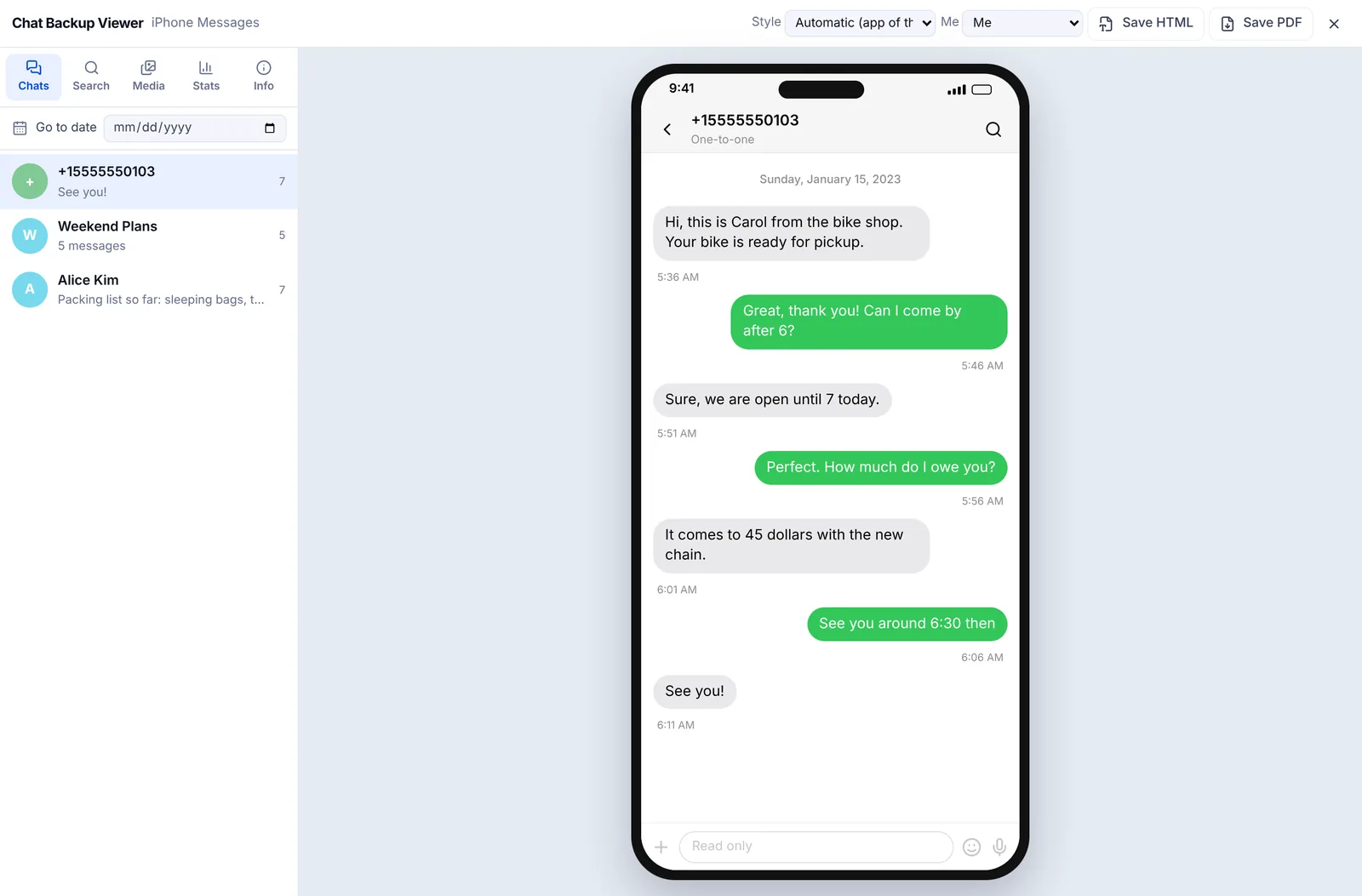
Drop the txt, the zip or the backup folder onto the Chat Backup Viewer. Leave zips zipped. The chat opens in bubbles that look like the app, and choosing your name under Me puts your messages on the right. Nothing is sent to a server; the file is read inside this browser.
Choose the chat and the period
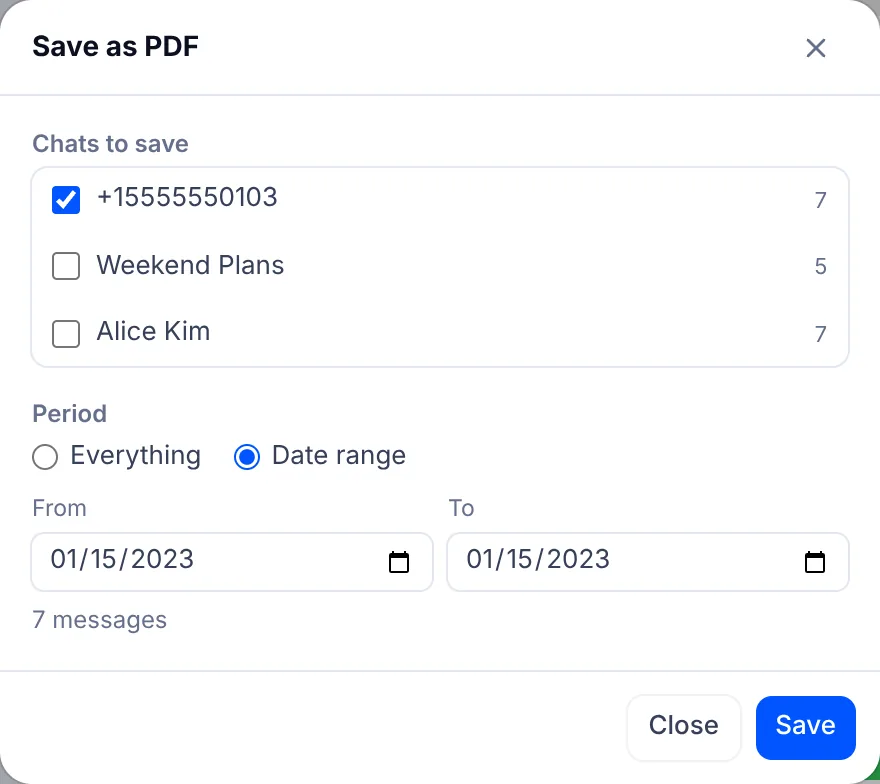
Press Save PDF at the top right. If the backup holds several conversations, tick the ones to save. Under Period, choose Date range and set the first and last day; the number of messages in that range shows straight away. That is how you print the three months that matter instead of five years.
What goes into the PDF
- A4 pages with bubbles in the same colours as the screen, yours on the right, theirs on the left.
- A date line wherever the day changes and a time next to each message. In group chats the sender's name sits above their bubble.
- A line at the foot of every page saying it is a copy made with the EZPZ File Chat Backup Viewer, converted from the original backup with the content unchanged, the date it was made and the page number.
- Deleted message notices, calls, and people joining or leaving appear as they did on screen.
- Photos and videos are written as their file names, such as [Photo] IMG_0042.jpg, to keep the file a sensible size.
The viewer is read only. It has no way to edit, delete or add messages. If you need the photos on paper, use Save HTML instead, tick Include photos, open the saved file in your browser and print it. Depending on the background graphics setting in the print dialog, the bubble colours may not print.
If the printout is for a dispute
Plenty of the people asking are preparing for a court case, and worry about getting it right. That is a real concern, but what to hand over and how is not something this article can answer.
Whether it is accepted as evidence is for the court to decide. If you plan to use it in a case, talk to a lawyer.
Printing with fewer pages
- Split long chats by period. One PDF holds up to 20,000 messages, so save a few months at a time and join them with Merge PDF if you need one file.
- In the print dialog, choose two pages per sheet and double sided. Print one sheet first to check the text is still readable.
- A single PDF prints the same at home, at a print shop or from a library computer.
Keep the original export
The PDF is a readable copy. Keep the txt, zip or backup folder you exported, untouched and under its original name. With the viewer you can make the same PDF again whenever you need to.
Check nothing is missing after you print
One worry that comes up on Reddit is a paid program whose printout quietly left messages out. Whatever tool you use, check the result.
- Compare the message count in the save window with the count on the viewer's Info tab.
- Check the first and last message dates on the Stats tab against the first and last pages of the PDF.
- If the viewer shows a time zone notice, choose the zone the backup was made in before saving, so the times are right.
For the difference between a backup and an export, see backup vs chat export.
Make a PDF in the Chat Backup Viewer
WhatsApp is a trademark of Meta. iMessage is a trademark of Apple. EZPZ File is not affiliated with either.
Questions
- Can I get a long iMessage chat into a PDF without scrolling?
- Yes. Back up the iPhone to a computer without encryption, open the backup folder in the Chat Backup Viewer, choose the chat and dates, and save as PDF. (Source: Reddit r/MacOS)
- Does every message get a date and time?
- Every message has its time beside it, and a date line appears wherever the day changes. (Source: Reddit r/ios)
- Can I edit the PDF before printing?
- No. The viewer has no editing features, and every page says it is a copy converted from the original backup, with the date it was made.
- Will a court accept it?
- Whether it is accepted as evidence is for the court to decide. If you plan to use it in a case, talk to a lawyer. This article only covers how to make and print the file.
- Can I print the photos too?
- The PDF lists photos by name. Export with media, use Save HTML with Include photos, then print that file from your browser. (Source: Reddit r/whatsapp)
Last updated October 27, 2026

