
How to read iPhone messages from a backup on your computer
iPhone Messages has no export button. To read years of texts on a computer, or keep them somewhere other than the phone, back the iPhone up to your own computer with encryption off. The messages are inside that backup folder, and you can open it in a browser as a chat and save it as a PDF.

A post on r/iphone asked something many people still ask: four years of texts on the phone, a Windows PC on the desk, and no obvious way to read one on the other. Another, years later, came from someone who had lost their father and wanted to keep every message they had exchanged.
This article covers one case only: your own iPhone, backed up to your own computer, so you can read your own messages.
iCloud backup vs a computer backup
iCloud Backup is for restoring a phone, and it is not a folder you can open. Apple also says that if you use Messages in iCloud, your messages sync to iCloud and are not included in the daily backup. What you need here is a local backup made over a cable to a Mac or Windows PC.
| iCloud Backup | Computer backup, unencrypted | Computer backup, encrypted | |
|---|---|---|---|
| Where it lives | Apple's servers | A folder on your computer | A folder on your computer |
| Mainly for | Restoring | Restoring, and reading in this viewer | Restoring |
| Opens in the Chat Backup Viewer | No | Yes, the whole folder | No |
| Includes | Messages only if Messages in iCloud is off | Texts, iMessages and photos | Adds saved passwords, call history and more |
1. Back up the iPhone with encryption off
Following Apple's support pages: on a Mac use Finder; on Windows use the Apple Devices app, or iTunes on older setups.
- Connect the iPhone with a cable and tap Trust on the phone when asked.
- Select the iPhone in the Finder sidebar, or in the Apple Devices app (General tab) or iTunes (Summary).
- If Encrypt local backup is ticked, untick it. You'll need that backup password to turn it off.
- Click Back Up Now and wait. When it finishes, the date and time of the latest backup appear.
Apple notes that encrypted backups hold things unencrypted ones don't, such as saved passwords, Wi-Fi settings, website history, Health data and call history. You can turn encryption back on after you have what you need.
2. Drop the backup folder into the viewer
On a Mac the backups are in ~/Library/Application Support/MobileSync/Backup/ (in Finder, Go > Go to Folder and paste the path). On Windows they are in %USERPROFILE%\Apple\MobileSync\Backup, or %AppData%\Apple Computer\MobileSync\Backup if that doesn't open. Inside is one folder per device with a long name of letters and numbers.
Drag that whole folder onto the Chat Backup Viewer, or use Open folder. It is read inside your browser, a piece at a time, and nothing is sent anywhere. The sms.db file on its own also works, but you'll get text without photos, so the whole folder is better.
3. Read it as a chat
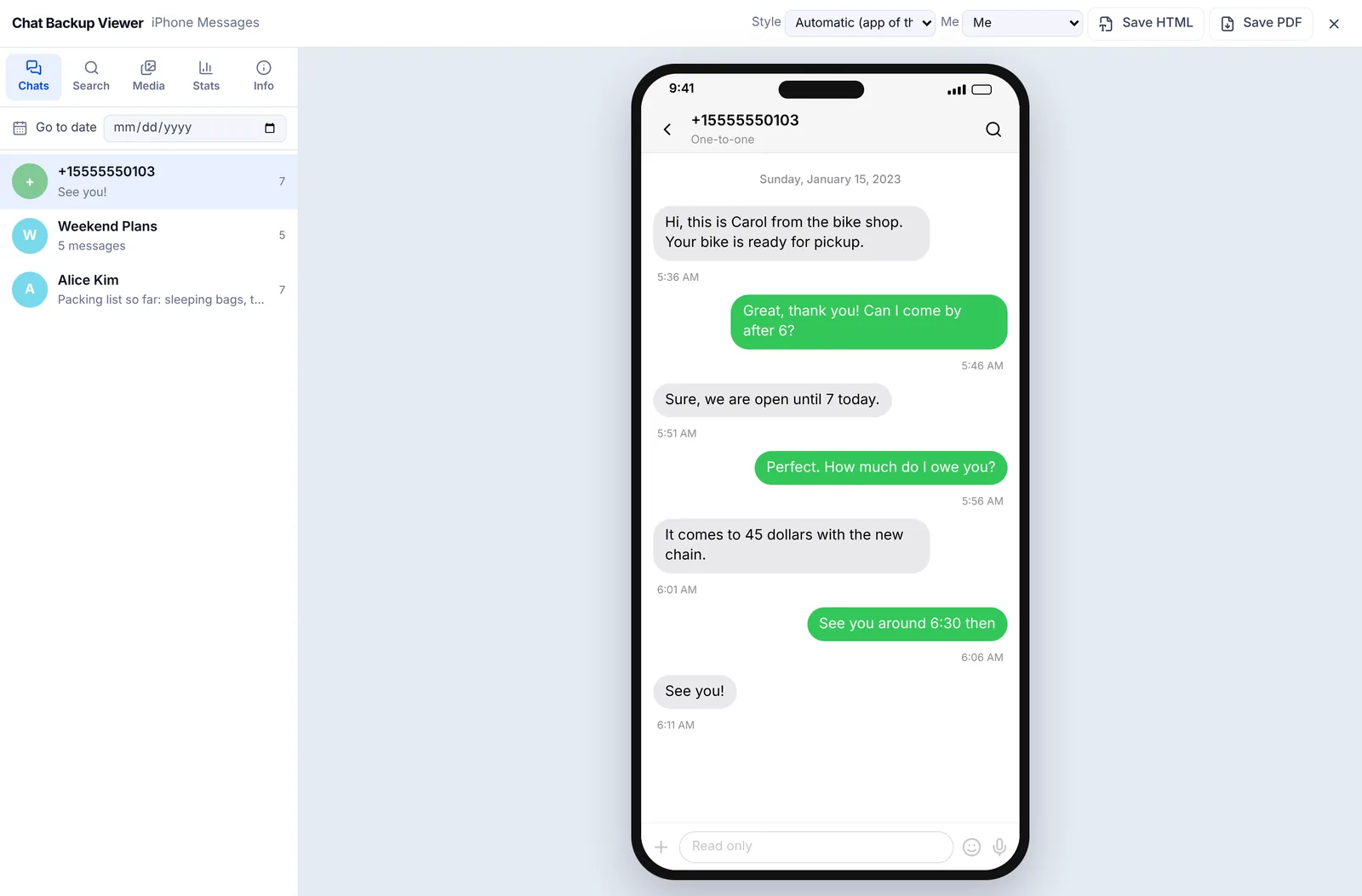
Conversations and group chats are listed on the left. Pick one and it opens with blue and green bubbles like the iPhone. Search finds a word, Go to date jumps to a day, and the Media tab gathers the photos in the backup.
4. Save as PDF
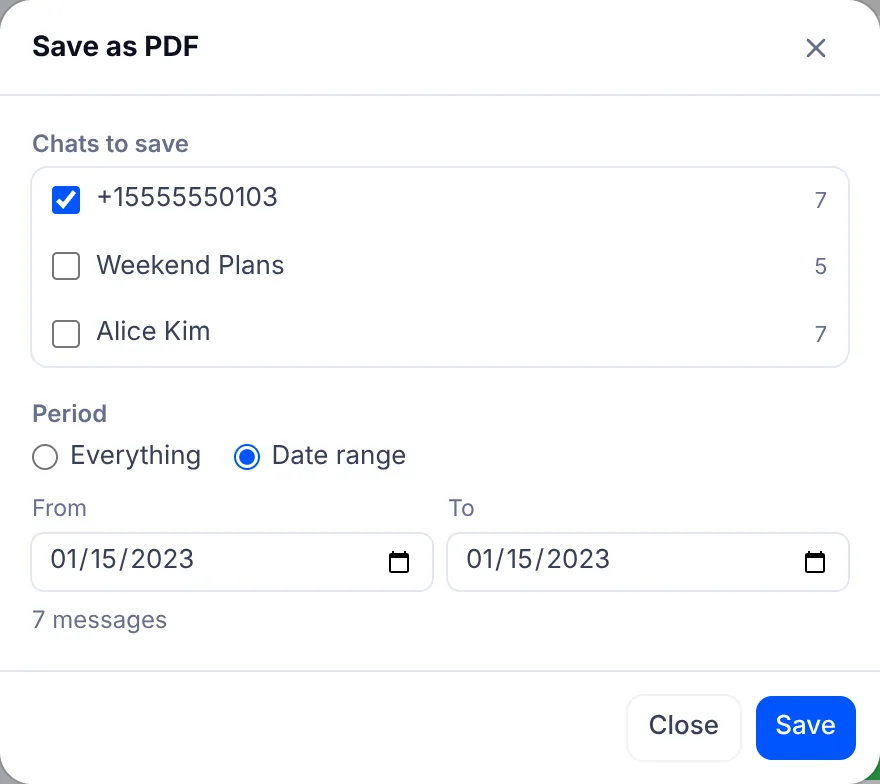
Save PDF at the top right opens a window where you tick the chats and choose a date range. The PDF has a date line wherever the day changes and a time on every message, and each page says it is a copy converted from the original backup, with the date it was made. The viewer is read only, so messages can't be edited. Photos are listed by name in the PDF; for the pictures themselves, use Save HTML with Include photos. Printing tips are in how to save a chat as a PDF.
Whether it is accepted as evidence is for the court to decide. If you plan to use it in a case, talk to a lawyer.
5. Check nothing is missing
One r/iphone post came from someone whose printout from a paid program had messages missing. Whatever you use, check before you rely on it.
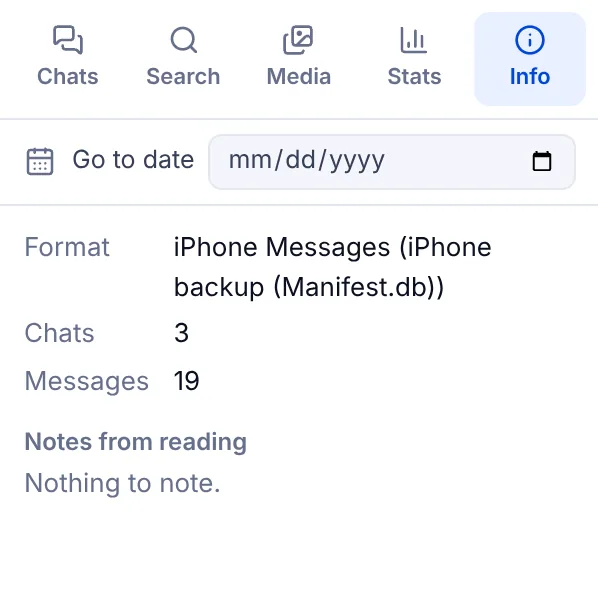
- Look at the chat and message counts on the Info tab and compare them with the count in the save window.
- Check the first and last message dates on the Stats tab against the first and last pages of the PDF.
- Read the Notes from reading on the Info tab, which say if some photos or files mentioned in the chat were not found in the backup.
If it won't open
| What you see | Why, and what to do |
|---|---|
| The backup is encrypted | Turn off Encrypt local backup and back up again |
| This backup format cannot be read yet | It is an old backup from iOS 9 or earlier. Make a new backup |
| There are no chats in this backup | Check the texts are still in the Messages app on the phone, then make a fresh backup |
| Photos show as placeholders | Only sms.db was opened. Drop the whole backup folder |
For how backups differ from chat exports in apps like WhatsApp, see backup vs chat export.
Open an iPhone backup in the Chat Backup Viewer
iPhone, iMessage, iCloud, Finder and iTunes are trademarks of Apple. EZPZ File is not affiliated with Apple.
Questions
- Can I read my iPhone texts on a Windows PC?
- Yes. Back up the iPhone with the Apple Devices app or iTunes with encryption off, then drop the backup folder onto the Chat Backup Viewer in Chrome or Edge. (Source: Reddit r/iphone)
- Can I keep every message with someone who has died?
- Make an unencrypted backup, open it in the viewer and save the chat as a PDF, or as HTML with photos. Keep the backup folder too. (Source: Reddit r/iphone)
- Why won't my encrypted backup open?
- Encrypted backups can't be read by the viewer. Untick Encrypt local backup, which asks for the backup password, and back up again.
- Does an iCloud backup work?
- No. The viewer opens backups stored on your computer. Apple says messages aren't in iCloud Backup at all when Messages in iCloud is on.
Last updated October 27, 2026
