
Make your photo's background white, without uploading it
A passport or exam form wants a plain white background, and your photo was taken against a cream wall at home. Here is how to make the background white without sending the photo to anyone, which photos work, and when an edited background can get a form rejected.

The usual situation: a passport, visa, exam or college form wants a photo on a plain white background, and the only recent photo you have was taken at home against a cream wall or a cupboard. Replacing the background takes a few seconds now. The question is where the photo goes while that happens, and whether the result is still acceptable to the office that receives it.
How free background removers pay for themselves
| Free | Where they charge |
|---|---|
| The preview | The download button |
| A low resolution result | The full resolution file |
| A watermarked result | Removing the watermark |
| A few images per day | Anything beyond that |
None of that is unreasonable: running a large model on a server genuinely costs money. It does mean the photo takes a trip through someone else’s machine.
Bring the model to the photo
The arrangement can be reversed. The model that separates subject from background is small enough to download into a browser tab, so the photo can stay on the device.
The cost moves rather than disappearing: instead of uploading each photo, you download roughly 4.6MB of model once. Every photo after that starts immediately. A larger HD model (47MB) is downloaded only when you need finer edges such as hair.
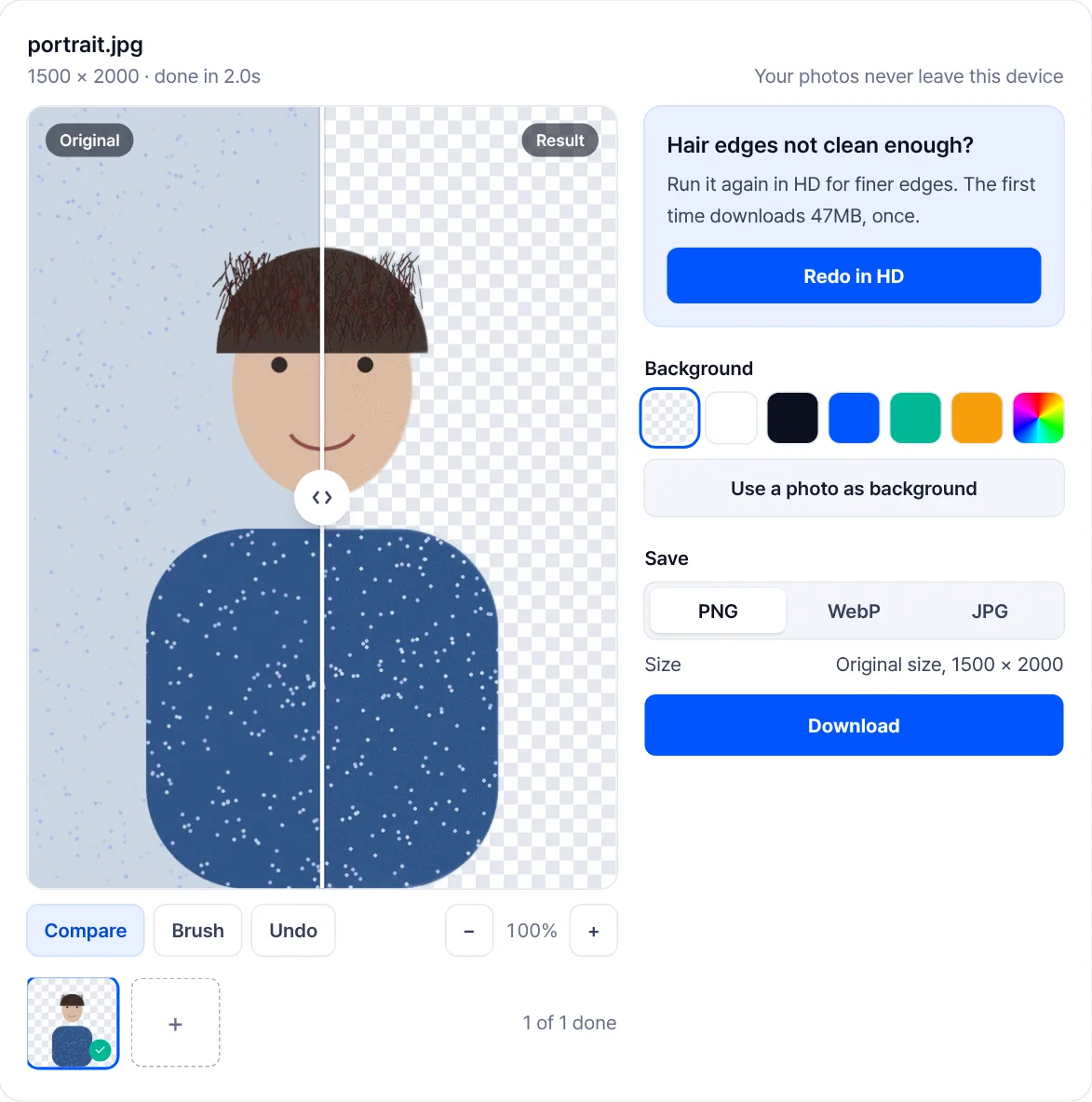
No watermark, no resolution cap, no daily limit. In exchange there is one wait at the start, and very large photos and HD lean on the device.
Which photos work
Whatever tool you use, the photo decides the result.
| Works well | Struggles |
|---|---|
| Subject and background differ clearly in colour | Clothing that matches the wall behind it |
| Simple outlines: bottles, shoes, bags | Mesh, lace (flyaway hair improves in HD) |
| Focus on the subject | Glass, water, anything see-through |
| Soft shadows | Subject touching or overlapping the background |
When the result is poor, reshooting beats retouching. A plain wall and one step of distance between the subject and that wall changes the outcome more than any setting.
When hair comes out blocky: HD and the brush
Redo it in HD first. The fast model shrinks the photo to 320 pixels before looking at it; the HD model looks at 1024 pixels. Flyaway hair and cat whiskers that the fast model erased come back. It can take more than 10 seconds per photo.
Fix whatever is still wrong with the brush. Painting with Erase makes that area transparent, painting with Restore brings the original photo back, and Undo takes back one stroke at a time.
Transparent or white
- Marketplace listings: many require a white background. Check the rules first.
- Slides and proposals: transparent, so the image sits on whatever is behind it.
- Print: keep it transparent and decide the background at the printing stage.
- A different background: use a photo as background to place your own picture behind the subject. It is cropped from the centre to fill the result.
Save as PNG or WebP when you need transparency. JPG cannot store it, so a JPG is filled with white unless you pick a background. Re-saving a transparent PNG as JPG in another program can fill the empty area with black.
Passport, visa and exam photos in India
A white background is only one rule among several. Size, head proportion, lighting and shadows all count, so a cut-out on white is a starting point, not a guarantee.
- Indian passport, paper application at a DPC, SPC or CSC: the instruction booklet asks you to "Paste your recent passport size photograph (4.5 cm length x 3.5 cm width) in colour" and says "Background of the photograph should be plain white". It also says "Photograph is NOT REQUIRED for applications submitted at Passport Seva Kendra (PSK)", where the photo is taken on the spot.
- Indian e-Visa: the photo must be a JPEG between 10 KB and 1 MB, and "The height and width of the Photo must be equal", so crop to a square after removing the background.
- Exam forms (UPSC, NEET, IBPS and others): each notice sets its own background, size and KB rules. Read the photo section of your own notification before editing anything.
Sources: the Passport Seva application form instruction booklet and the Indian e-Visa site. For KB and pixel limits form by form, see the article on photo and signature sizes for Indian exam and visa forms.
When editing is not allowed
Some forms do not want an edited photo at all. The SSC CHSL 2026 notice has the photo captured live during the application and says: "In no case should the candidate capture the photographs of his/her pre-existing photograph." There, no background tool applies; sit in front of a plain light wall instead.
Elsewhere, a replaced background can make a photo look edited: a hard halo round the hair, a face lit from one side against flat white, shoulders cut too cleanly. If a form says the photo must be recent and unaltered, or a reviewer rejects edited photos, a fresh shot against a white sheet or wall is the safer route. When in doubt, check your form's rules or use a photo studio.
Making it white on a phone
- Open Remove background in your phone browser and choose the photo. The model downloads once (about 4.6 MB), then the cut-out runs on the phone itself.
- If the hair edge looks rough, press Redo in HD. It downloads a larger 47 MB model the first time, so use Wi-Fi.
- Choose white as the background and save as JPG, which most Indian forms ask for.
- Crop and resize to the form's size afterwards, then compress to its KB range if needed.
A working order
- Remove the background.
- Resize afterwards: cutting out first keeps the edge cleaner.
- Compress last, if the file is still too big.
- Strip metadata if the image is going somewhere public.
Frequently asked questions
- How do I make a passport photo background white on my phone?
- Open Remove background in your phone browser, choose the photo, pick white as the background and save as JPG. Use Redo in HD if the hair edge is rough. Then crop and resize to the size your form asks for.
- Is a white background required for Indian passport photos?
- For a paper application, yes: the Passport Seva instruction booklet says the background "should be plain white", with a 4.5 cm x 3.5 cm colour photo. At a Passport Seva Kendra a photo is not required, because it is taken there.
- Will an edited background get my form rejected?
- It can, if the edit is visible or the form forbids altered photos. SSC, for one, captures the photo live. Check your notification; if it asks for an unedited recent photo, take a new one against a plain white wall.
- Why is the first run slow?
- The model is downloaded to your browser. That is the cost of not uploading the photo. Your browser keeps it, so it happens once. HD downloads a separate 47MB model the first time you use it.
- Hair comes out blocky.
- Press Redo in HD. It looks at the photo at 1024 pixels, so fine strands survive. Touch up anything left with the brush.
- What format is the result?
- You choose PNG, WebP or JPG. Pick PNG or WebP for transparency. WebP files are smaller.
Last updated October 14, 2026 · Accurate as of October 2026. Passport photo rules are quoted from the Passport Seva application form instruction booklet (V3.0), e-Visa rules from indianvisaonline.gov.in, and the SSC rule from the CHSL 2026 notice, all checked 14 October 2026.


