
Where a 200 KB PDF limit appears
Two official documents, checked on 10 October 2026. Always read the notice for your own application.
| Body | Document | Rule | Notice |
|---|---|---|---|
| Ministry of Tribal Affairs (National Scholarship Portal) | Each document for the fellowship, PDF or JPEG | Not more than 200 KB per document | Ministry of Tribal Affairs fellowship FAQ on the National Scholarship Portal (23 June 2025) |
| NTA | Category certificate, Class X certificate and marksheet, PwD certificate, address proof | PDF, 50-300 KB | NEET (UG) 2026 Information Bulletin (8 February 2026), p.15 |
The fellowship FAQ says “the size of each document should not exceed more than 200 KB”. The NEET row is shown as a reference: a file of 200 KB or a little less sits inside 50-300 KB, as long as it does not drop under 50 KB.
How to get under 200KB
Keep one document per file. The fellowship FAQ puts the 200 KB limit on each document, so there is no need to merge your certificates into one PDF, and a merged file would have to fit every page into 200 KB. Add all the PDFs together instead: each one is handled on its own and gets its own 200 KB.
A one-page certificate photographed with a phone is usually a few MB, but 200 KB is often enough for it in colour. The tool first shrinks only the picture inside the PDF, from gentle to stronger settings, and stops at the first result under 200 KB. So you get the sharpest version that fits, not the smallest one.
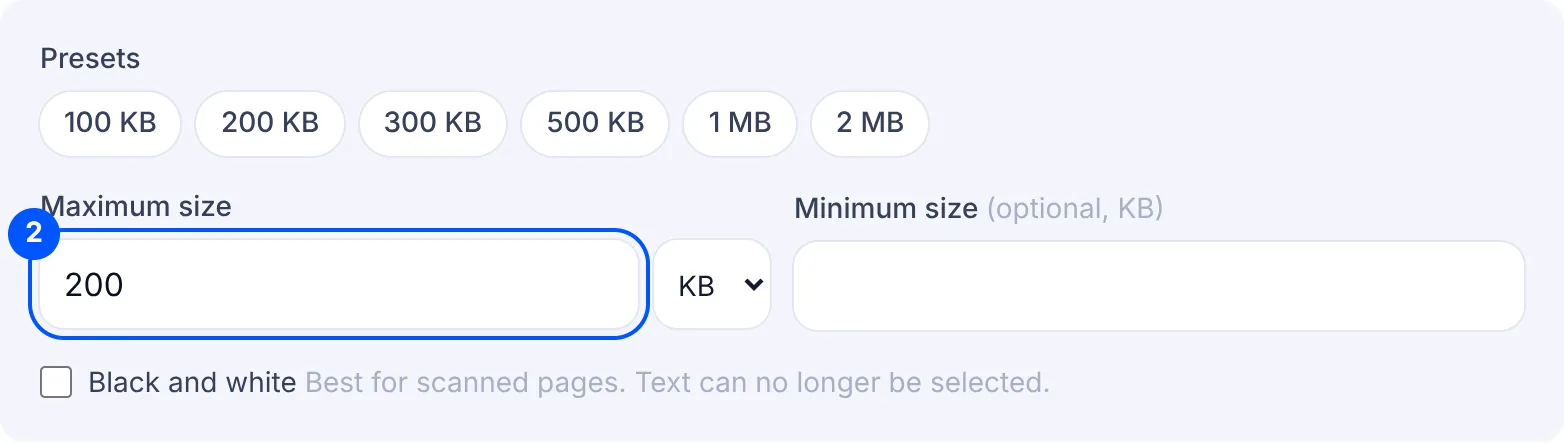
Marksheets are harder because of the small print. After compressing, open the file and zoom in on the marks and the roll number. If they are blurred, run it again with Black and white turned on. It makes a scan much smaller, so the page can keep more of its resolution within the same 200 KB. Coloured stamps and signatures lose their colour this way, so look at those too.
Some certificates have two or more pages, for example a marksheet with printed instructions on the back. If the form only needs the front, keep just that page with Split PDF and compress it. The whole 200 KB then goes to the page that matters.
The fellowship FAQ accepts JPEG as well as PDF. If you have a single photo of the document and the portal field takes JPEG, you can compress the photo directly with Compress image to size. If the field wants a PDF, as the NEET documents above do, turn the photo into a PDF with Images to PDF first.
Why your file is still rejected
- The merged file is over 200 KB. If you combined several certificates into one PDF, each page got only part of the limit. When the portal has a field for each document, upload them to the portal one by one, each as its own PDF.
- The file is under the minimum. The NEET bulletin asks for at least 50 KB for these PDFs, and a one-page scan in black and white can come out smaller. Type 50 KB in the minimum box and check the final KB on the result card. If it is still too small, run it again without Black and white.
- The field wants PDF and you gave a JPG, or the other way round. Check what the form asks for each document. The NEET documents listed above must be PDF.
- The page is cut off or tilted. Compression does not fix a bad scan. If an edge of the certificate or part of the marks is missing, take the photo again with the page flat, in good light and fully in view.
